


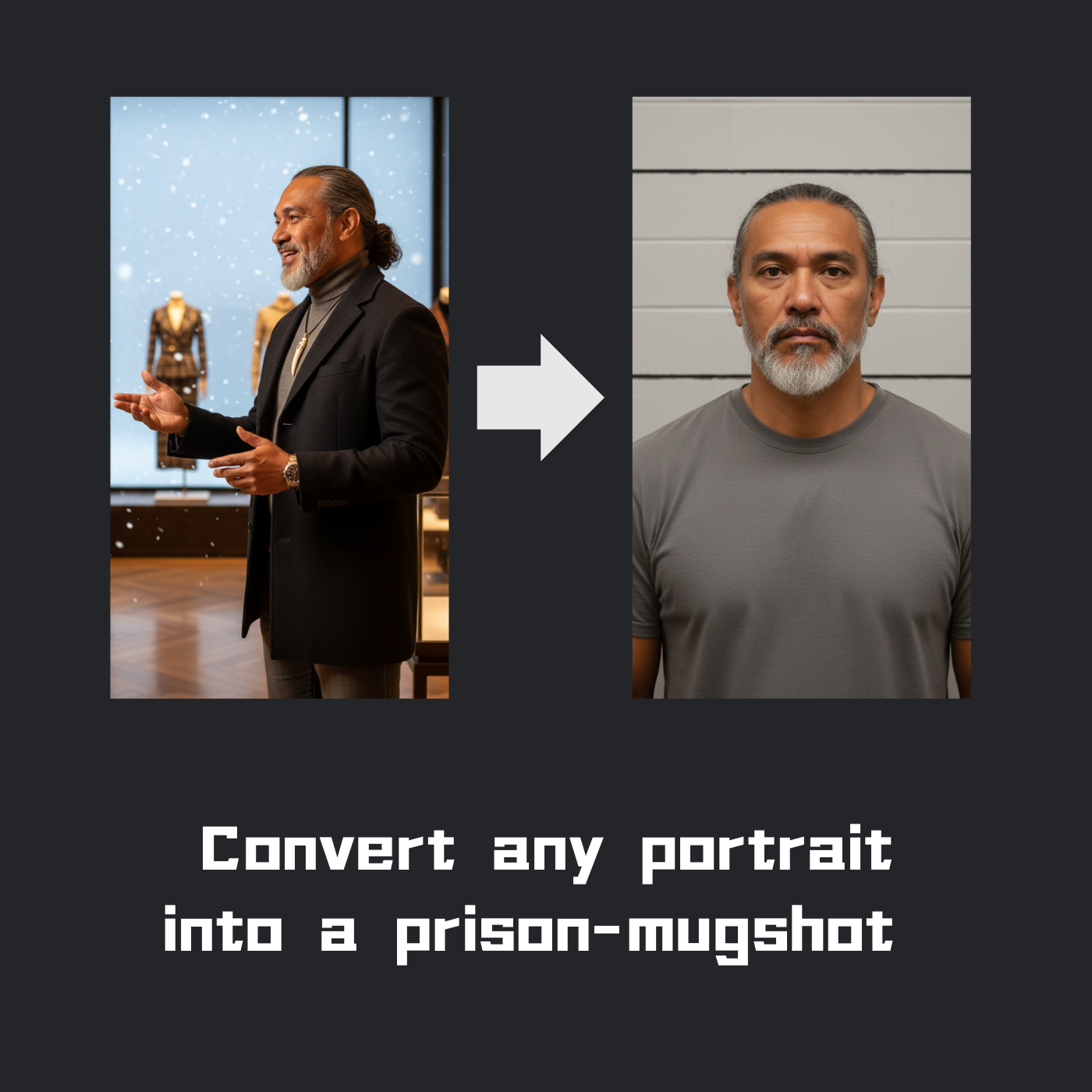
Turning a standard portrait into a mugshot can add a unique twist to your photos, whether you are looking to have fun, experiment with creative projects, or generate buzz on social media. With the right methods and tools, anyone can achieve a realistic mugshot effect with ease. Exploring sources such as a mugshot maker offers intuitive solutions for quick transformations, making the process accessible even for beginners.
This step-by-step guide covers the essentials of mugshot aesthetics, the latest AI and manual editing techniques, and tips for enhancing realism using physical props and backgrounds. Whether you want an authentic police photo vibe for an art piece or an amusing makeover for your next Instagram post, understanding the creative elements behind the effect is key to making your results stand out.
Mugshots have become a popular theme across creative communities and trend regularly on apps like TikTok and Instagram. The process of recasting a simple portrait through these methods can help unlock new storytelling opportunities in your photo projects, and social sharing has become part of the fun in today’s creative landscape.
If you plan to share your mugshot creation as part of a public portfolio or social campaign, always consider the artistic impact and potential audience reactions. Paying attention to context and compliance ensures your mugshot transformation remains harmless entertainment rather than becoming a subject of misunderstanding. For a more detailed overview of cultural and creative trends involving mugshots, see this article in The New York Times.
Understanding Mugshot Aesthetics
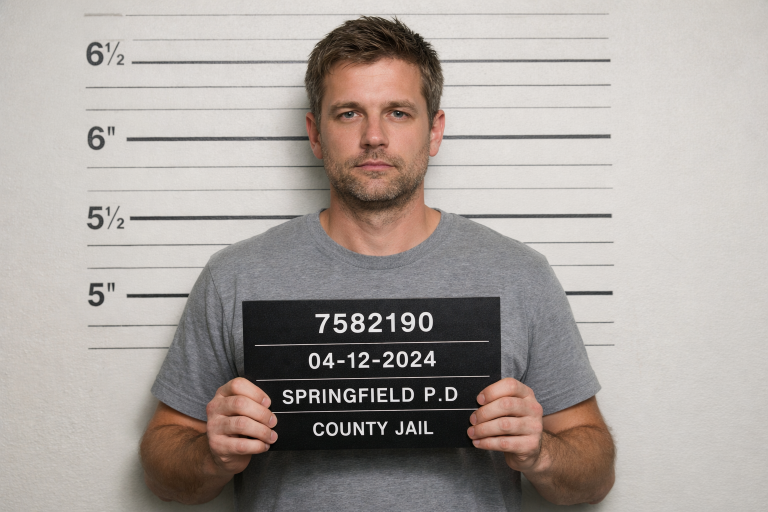
A traditional mugshot is a front-facing photo of a subject with a neutral or stern expression. The image is typically framed with shoulders straight and direct eye contact, set against a background featuring a height chart. The lighting is usually bright and direct with minimal shadow, meant to remove all ambiguity from facial features. A placard with identification details, such as a name, number, or date, is traditionally visible at chest height.
Knowledge of these staple design choices helps you accurately replicate the style and reinforces the realism of your mugshot transformation. Observing real law enforcement mugshots gives insight into authentic composition, lighting, and positional details that will translate effectively into your final creation.
Using AI-Powered Tools
Recent advancements in AI-powered editing have revolutionized photo transformation. Online applications like VEED’s AI Mugshot Generator enable users to automatically impose backgrounds, height charts, and placards over existing portraits with a simple upload. These tools can replicate lighting effects and even generate realistic police attire, making them highly useful for quick, convincing mugshot results without specialized software or advanced editing skills.
Other platforms, such as YouCam Perfect, offer AI Replace and smart background removal, letting you swap casual clothing for classic prison stripes or neutral colors as part of the transformation. Many of these applications offer free basic options and paid plans for higher-resolution downloads and advanced customization. For a summary of the best AI image editing tools available, check out this resource from PCMag.
Manual Photo Editing Techniques
Artists and photo enthusiasts who prefer hands-on editing can turn to software such as Adobe Photoshop, GIMP, or online editors like Photopea. Here is a simple workflow to manually turn any standard portrait into a convincing mugshot:
- Background Replacement: Remove the current background and replace it with a neutral gray, off-white, or white background. Overlay a height chart graphic for added authenticity.
- Lighting Adjustments: Brighten the image and increase contrast to minimize shadows, imitating the flat lighting seen in official mugshots.
- Placard and Text: Use the text tool to add a white or black rectangular placard with a black border at chest height. Fill it with mock identification details such as a name, booking date, and fictional case number.
- Texture and Grain: Apply subtle grain or film grain filters to replicate the texture of printed mugshots. A light blur or monochrome filter can help match the look of older archival police photos.
Saving your final result as a high-resolution image ensures cleaner lines and better quality, especially if you plan to share or print your creative mugshot.
Incorporating Props and Backgrounds
For photoshoots or scenarios where digital tools are not preferred, using physical props and settings can dramatically boost the credibility of your mugshot photo:
- Height Chart: Print a large-format height chart or create one on a blank wall with removable tape or markers.
- Placard: Handwrite or print a placard with fake details and hold it for the photo. Black construction paper and white chalk are simple options.
- Wardrobe: Choose solid-color tops or striped shirts to mimic jail attire. Keep jewelry and accessories minimal or remove them entirely, as would be done in actual mugshots.
Combining staging techniques with digital editing produces professional results without a professional studio setup.
Legal and Ethical Considerations
While mugshot-style photos can be humorous and expressive, context is critical. Avoid using real or sensitive information that could be mistaken for authentic records. Always respect the privacy and consent of any photo subjects and avoid using these effects to defame, mislead, or harm others, even in jest. Mugshot transformations should stay in the realm of parody, art, or social sharing and not cross into inappropriate territory.
Read more on the ethical dimensions of digital image manipulation and responsible sharing practices at the Consumer Reports guide on mugshot images and online privacy.
Sharing Your Creation
Once you have created your mugshot, share it on social media or with private communities for reactions and fun. TikTok, Instagram, and Twitter are platforms where mugshot makeovers often trend, especially when combined with creative storytelling or humor. When posting, use related hashtags to join broader trends and engage with others exploring the same theme.
If your mugshot is part of an art project or brand campaign, clearly indicate its fictitious nature and credit any sources used for backgrounds or graphics. This transparency helps clarify artistic intent and preserves the positive spirit of the transformation, keeping the focus on creativity and fun.
By following these guidelines and utilizing both physical and digital techniques, you can craft an eye-catching mugshot image that combines creativity, authenticity, and responsible sharing for personal or professional use.
